Merge Aadhaar / Aadhar Card Front & Back in One Page — Both Sides Online Free
Dark, blurry or tilted phone photo? Crop it with your finger, let the tool auto-enhance lighting, and merge Aadhaar (Aadhar) card front and back in one page at standard ID card size (85.6 × 54 mm) — prepared for printing or submission where the receiving institution accepts this format. Fixed presets for ID card (85.6×54 mm), 3.5×4.5 photo & signature. No app, no watermark, and nothing is uploaded — 100% private in your browser.
1 Add photos (or drag & drop)2 Crop, straighten & clean3 Download each — or join into one
Add document photos
Aadhaar, PAN, forms, photo, signature, receipts — lighting is cleaned automatically, and you crop only if you want to.
or drag & drop images anywhere in this box · JPG, PNG, WEBP · supports up to 15 MB per image · after adding, press ✂ Crop on any image to drag the corners yourself · nothing is uploaded — everything stays on this device
0 images
Join images into one
Tick “Use in join” on the images above, set the order with the ↑ ↓ arrows, then choose how to join them.
Direction
Arrange
Spacing & border
.jpg
✂ Crop & straightenPress Crop on any image, drag the corner handles, and use the Tilt slider to straighten a slanted photo. Lock the box to ID card (85.6×54 mm), photo (3.5×4.5 cm), signature (3.5×1.5 cm) or square.
Auto clean & EnhancementUse Auto clean for lighting fix, or tap Enhancement for scanner-grade shadow removal and crisp white background like a Google Drive scanned copy.
Pinpoint Edge Pitch & TiltInside the crop editor, use Tilt (↺ ↻) to straighten angles and Pitch (▽ △) to square up keystoned edges with pinpoint accuracy before joining or printing.
Print & download setupWhether editing a single document or joining two images, choose photo size (actual card 85.6 mm, full page, photo sizes), fit, rename, print, or share straight to WhatsApp.
Private by designImages never leave this computer. Everything runs locally in your browser.
Important: EasyJoinImage is an independent image-formatting tool. It is not affiliated with UIDAI, SSC, IBPS, UPSC, banks or any government agency. Requirements may vary; always check the official submission instructions.
✓No Upload (0 Bytes to Server)
✓Browser Processing
✓No Registration Needed
✓100% Free & Offline Ready
Visual Step-by-Step Guide
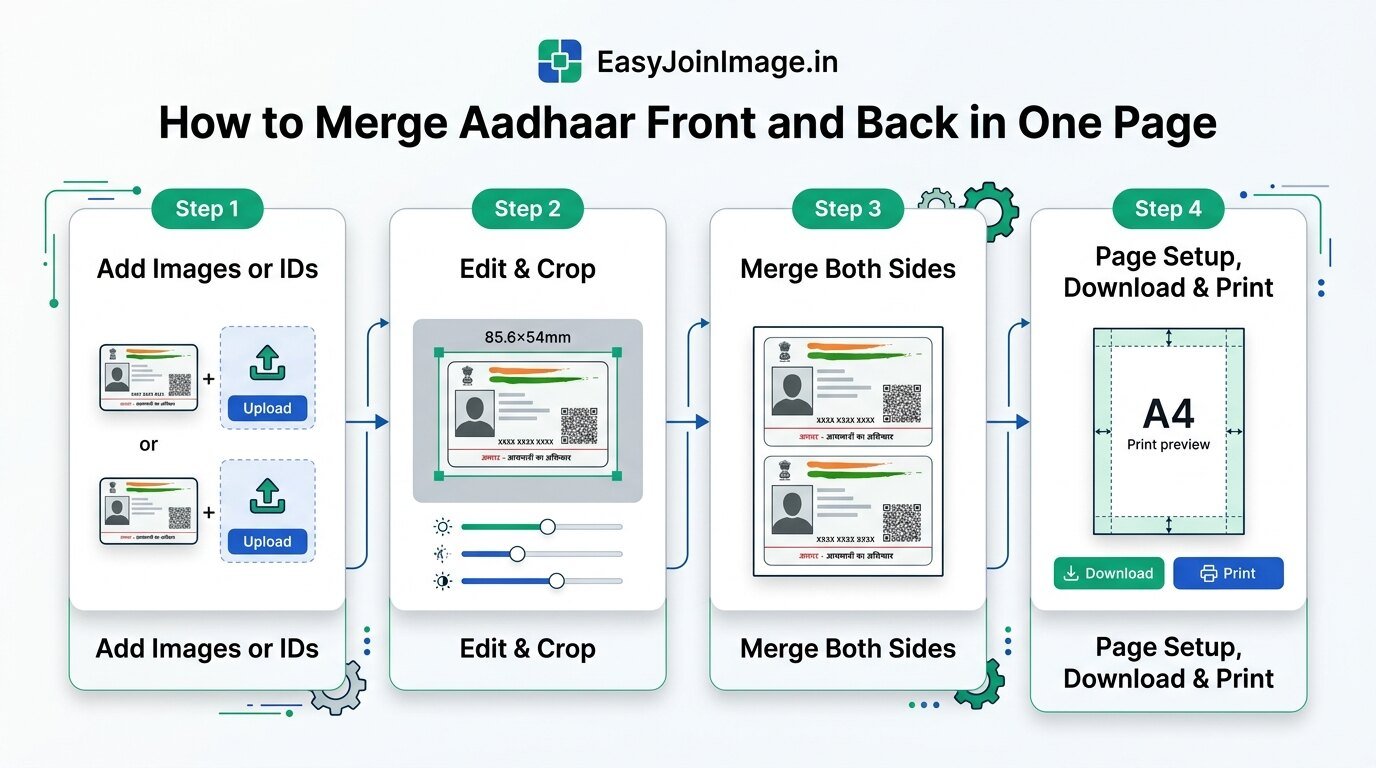
How to crop, merge front and back sides, and prepare your Aadhaar card for print or download in 4 quick steps:
Visual Workflow: 4 steps to add, crop (85.6×54 mm ID preset), merge both sides, and print or download Aadhaar card on one page. (Tap image to view full resolution)
Popular Tools
Fast, privacy-first single-purpose tools for Indian documents and examination uploads:
Clean and merge your documents in three straightforward steps:
1. Select
Add Photos
Select or drop photos of your identity card front and back from your smartphone, tablet, or desktop.
2. Edit
Crop & Enhance
Apply the ID Card preset (85.6×54 mm) to trim boundaries. Use tilt correction and auto-clean to remove shadows.
3. Download
Download or Print
Click Join to combine vertically, then download as a clean JPG or print at 100% scale directly on A4 paper.
Why Combine Both Sides of Aadhaar Card on One Page?
When presenting your Aadhaar card for official, educational, or administrative requirements, submission forms and receiving desks frequently request both the front and back of the card on a single page. This eliminates multiple loose photocopies and ensures both identity details (name, photo, DOB, Aadhaar number) and residential address details are visible together.
Physical identity cards in India—including Aadhaar PVC cards, PAN cards, Voter IDs, and Driving Licences—are manufactured to the standard ISO CR-80 specification (85.6 mm × 54 mm). EasyJoinImage's built-in ID Card preset locks this precise ratio so your documents retain realistic physical proportions without stretching or distortion.
2. Practical Photography & Cropping Tips
For clean, scanner-grade results when using a smartphone camera:
Place the card on a flat, neutral surface in natural daylight to avoid heavy shadows and flash glare.
Hold your phone parallel to the card. If slightly angled, use EasyJoinImage's Tilt slider to square the edges.
Crop tightly to the card borders to remove background clutter like table grain or fingertips.
Ensure the QR code, photograph, and text lines remain crisp and legible before joining.
3. Recommended A4 Print Settings
When printing the joined front and back document onto standard A4 paper:
Select Actual Size or 100% Scale in your browser or printer dialog.
Turn off "Fit to Page" or "Shrink to Fit", which may unintentionally enlarge or shrink the card.
Both colour and high-contrast black-and-white printouts are prepared for printing or submission where the receiving institution accepts this format.
4. Zero-Upload Privacy Guarantee
Some online document-processing services may upload files to remote servers. EasyJoinImage is designed differently: processing takes place locally in your browser. All image transformations execute via your device's HTML5 Canvas and WebAssembly threads. You can load this page, disconnect your internet connection, and merge documents completely offline.
Free Document & File Converters
100% private in-browser document conversion — zero server upload, instant processing:
How do I merge Aadhar card front and back in one page?
Click Select images to add your front and back photos. Use the ✂ Crop button with the ID card 85.6×54 preset to clean the borders, tick both images, choose Vertical direction, and press Join images. You can then download the single JPG or print directly onto an A4 page.
How do I print Aadhar card both sides on single A4 paper?
Upload your front and back photos, join them vertically, and tap the Print button. Select Photo Size as Actual card size (85.6 mm) or Half page, keep scale at 100% / Actual Size in your browser's print dialog, and print directly on A4 paper.
Can I save the merged Aadhar card front and back as a PDF?
Yes. After joining both sides, click Print and select Save as PDF as the destination in your browser. This creates a clean A4 PDF file ready for KYC uploads and online applications.
How do I straighten a tilted or crooked photo of an ID card?
Tap Crop on the card image and use the Tilt slider (-30° to +30°) or Pitch perspective slider to square up angled phone photos before cropping. The grid alignment ensures your card edges are perfectly horizontal.
What is the exact physical size of an Aadhaar card for printing?
An official physical Aadhaar card conforms to international standard ISO CR-80 card dimensions: 85.6 mm × 53.98 mm (approx. 3.370 × 2.125 inches). Our ID card preset locks these exact proportions so the printed card fits inside PVC laminating pouches.
Is it safe to merge my Aadhaar card online?
Yes, 100% safe. EasyJoinImage processes everything locally in your client browser memory using HTML5 Canvas. Your Aadhaar photos and confidential numbers are never uploaded to any server or cloud storage.
Aadhar card aage piche ek page me kaise kare?
Dono side (front aur back) ki photo Select images se add karein, Crop button par tap karke card border set karein, dono images par tick lagayein aur Join images par click karein. A4 paper par direct print karein ya JPG download karein.
Can I also merge PAN card, Voter ID, and Driving Licence front and back?
Yes. Indian PAN cards, Voter IDs, and Driving Licences use the same standard CR-80 card dimensions (85.6 mm × 54 mm) and can be merged on one sheet using this exact tool.
Disclaimer & Official Guidance: EasyJoinImage is an independent utility and is not affiliated with UIDAI, SSC, IBPS, UPSC, banks, or any government agency. "Aadhaar", "PAN", and other document trademarks are referenced solely for descriptive and formatting guidance. To download official e-Aadhaar or order PVC cards, visit uidai.gov.in ↗. To verify current exam notifications, consult respective official recruitment portals. Last reviewed: September 2026.